littleWEBZ Help: The Signal Finder
Hold the button 3 seconds: the stick becomes a silent Wi-Fi and Bluetooth meter that helps you look for hidden gadgets.
Signal Finder
The Signal Finder turns the stick into a silent radio meter. Use it to check a room, like a hotel room or a rental, for hidden gadgets that send Wi-Fi or Bluetooth signals, such as hidden cameras or tracking tags.
Start and stop
- Plug the stick into a power bank so you can carry it around.
- Wait for the eyes, then hold the button 3 seconds. The screen says "Signal Finder".
- To stop, hold the button 3 seconds again, or unplug it.
Reading the meters
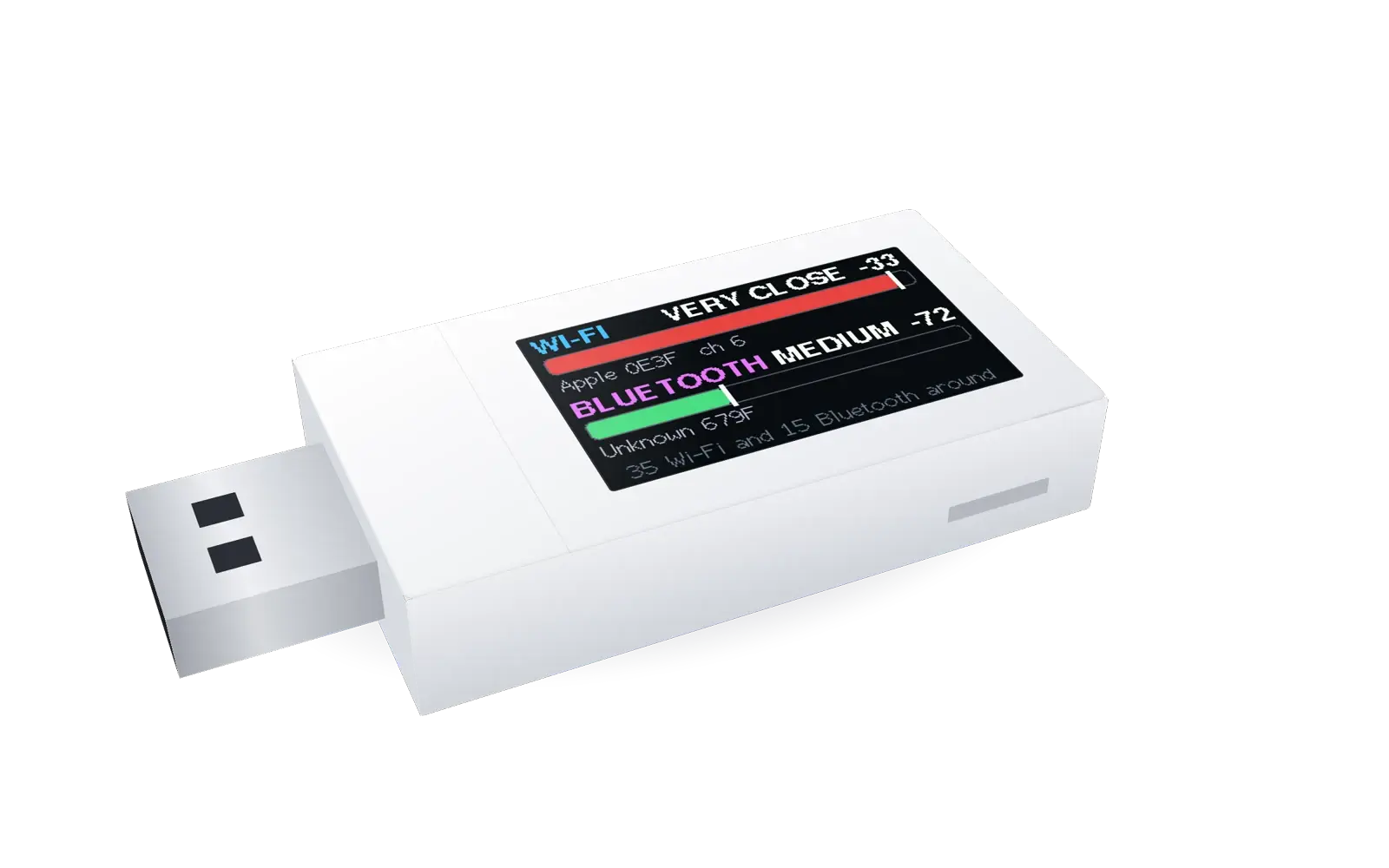
There are two meters: WI-FI on top and BLUETOOTH below.
- A longer bar means a stronger signal. Green is weak, yellow is medium and red is strong.
- The word tells you how close: FAR, MEDIUM, NEAR or VERY CLOSE. The number is the signal strength in dBm: −30 is very strong, −90 is very weak.
- The thin white line is the highest level of the last few seconds. A gadget that is quiet for 3 seconds slowly drops, and after 30 seconds of silence it is forgotten. It helps you notice when you walked past the strongest spot.
- Under each meter you see which gadget it follows. You see the maker, if the stick knows it, and the last 4 characters of its address, like "Espressif 3F2A". Wi-Fi gadgets also show their channel ("ch 6"). "Private" means the gadget hides its maker. "Unknown" means the maker is not on the stick's short list.
- The bottom line takes turns: how many Wi-Fi and Bluetooth gadgets are around, then a reminder of the buttons.
Warning words
| BUSY | This Wi-Fi gadget is sending a lot of data. Video cameras send a lot. |
| CAM MAKER | Its maker also makes security cameras. |
| TRACKER? | This Bluetooth gadget looks like a tracking tag (like an AirTag, Tile or SmartTag). |
These words are clues, not proof. A TV can be busy, and a phone can look like a tracker. Use them to decide what to look at more closely.
The button in Signal Finder
| What you do | What happens |
|---|---|
| Press once | The meters follow the next gadget, from strongest to weakest. A ">" shows you picked it. After the last one, they go back to the strongest. On the radar picture, a press goes back to the meters. |
| Press twice quickly | Starts a turn to find the direction (see below). |
| Hold 3 seconds | Back to littleWEBZ. |
Finding the direction: the turn
- Pick the gadget you want with single presses.
- Hold the stick flat against your chest, screen toward you.
- Press twice quickly. Then turn slowly to your right (clockwise), one full circle, in about 10 seconds. The ring on the screen shows how far you are. Always turn to the right: turning left mixes up the directions.
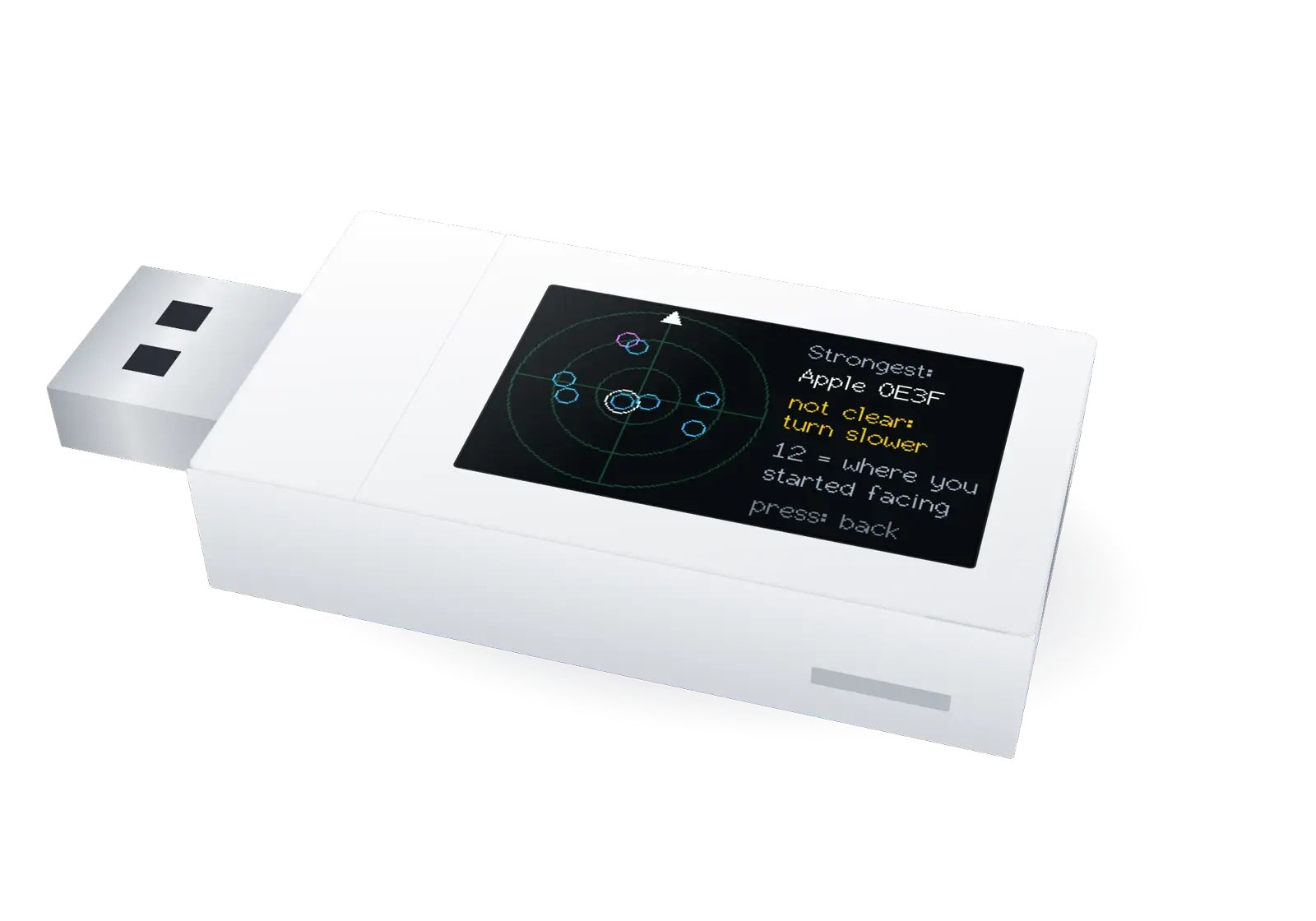
- The stick then shows a radar picture. The arrow at the top (12 o'clock) is the way you faced when you started. Each dot is a gadget (up to the 8 strongest): blue for Wi-Fi, pink for Bluetooth. The ringed dot is the one the meters follow. A dot closer to the middle has a stronger signal.
- On the right, the stick names the strongest gadget and tells you where it is, like "at 4 o'clock". That means: from where you started, turn to where the 4 is on a clock face.
This works because your body blocks part of the signal. The signal is strongest when you face the gadget.
A filled dot has a clear direction. An empty dot, or "not clear: turn slower", means the stick could not tell. Try again, turning slower and more evenly.
Hot and cold
After the turn, walk the way it showed and watch the meter. The bar grows as you get closer, like the game "hot and cold". The white line shows the highest level, so you notice when you pass the closest spot. Check that area: smoke detectors, clocks, chargers, lamps, picture frames, plants and air vents.
What it cannot do
- It only hears 2.4 GHz Wi-Fi and Bluetooth Low Energy, the kind used by tags, watches and most small gadgets. Some newer gadgets use 5 GHz Wi-Fi, and some older ones use "classic" Bluetooth. The stick cannot hear those.
- It follows at most 64 Wi-Fi and 64 Bluetooth gadgets at a time, the strongest ones.
- A camera that only saves video on its own memory card, or that uses a cable, sends no signal. The stick cannot find it.
- Gadgets that use very fast Wi-Fi (like laptops and new phones) look quieter than they are, so they may not show BUSY. Simple gadgets, like most small cameras, are measured well.
- Walls, furniture and people change signals. Directions are rough, about one eighth of a circle.
- The Signal Finder helps you look. It cannot promise that a room is safe. If you find something worrying, do not touch it: tell the hotel or the police.
This is part of the littleWEBZ Help guide. The same guide is built into every stick: tap the ❓ Help tab.